
Wallpaper Engine for Mac: use a native alternative
No. Wallpaper Engine is Windows only. There is no Mac version, it does not run under Rosetta, and buying it on Steam will not put it in your Mac library. The native route is a Mac app such as Walyro, which plays your own videos as wallpaper and draws four generated scenes that need no video file.
Short answer for Mac users
If you searched for Wallpaper Engine on Mac, the first answer is simple: there is no official Wallpaper Engine desktop app for macOS.
Next you need a native app that plays your own videos and puts motion on the desktop when you have none. Walyro does both.
- Official desktop support
- Wallpaper Engine's Steam listing is for Windows desktop use; Walyro is built for macOS 14.0+
- Mac workflow
- Your own MP4, MOV, and M4V files, built-in starter clips, and generated scenes
- Scene wallpapers
- Four generated scenes drawn on the Mac; Workshop scenes do not run on macOS
- Rotation
- Playlists rotate saved wallpaper sets with shuffle and repeat
- Display control
- Run wallpapers on all displays, the main display, or one selected screen
- Formats
- MP4, MOV, and M4V; H.264 or HEVC plays best
- Purchase
- One-time purchase, no subscription or ads
No, Wallpaper Engine does not have an official Mac desktop version
Wallpaper Engine's Steam listing shows Windows 10 and Windows 11 as the supported desktop systems, plus a free Android companion app. There is no macOS desktop version.
On a Mac you need a native app that gets the same result without a workaround: moving wallpaper from your own files, or drawn by the Mac itself, with pause and per-display controls.
Why there is no Mac port, and probably never will be
This is not a case of a small team not getting around to it. Wallpaper Engine renders wallpapers by drawing into the Windows desktop shell, underneath your icons and windows. The way it gets there is specific to Windows: it hooks the desktop window that Explorer owns, and it draws through Direct3D.
macOS has no equivalent of that window, and it has no Direct3D. A Mac app that wants to sit behind your icons has to go through AppKit and Metal instead, and it has to satisfy App Store sandbox rules on top of that. The result is that porting Wallpaper Engine is closer to rewriting the rendering layer than to recompiling it, which is why the answer has stayed the same for years.
The workarounds people try, and what actually happens
Most people who search for this have already thought of a way around it. Each one runs into the same wall, which is that Wallpaper Engine can only draw onto a Windows desktop, and none of these give it a Mac desktop to draw on.
Boot Camp is the one worth ruling out first, because plenty of older advice still points at it. It only ever worked on Intel Macs, and Apple has not shipped it since the move to Apple silicon. If your Mac has an M-series chip, there is no Boot Camp Assistant to open.
- A Windows virtual machine will run it, but the wallpaper appears inside the VM window. Your macOS desktop is unaffected, and you are paying for a full copy of Windows to animate a rectangle.
- Wine and CrossOver translate Windows API calls, but there is no Explorer desktop window on macOS for the app to hook into, which is the exact thing it needs.
- Buying it on Steam does not help. The Steam listing is Windows only, so it will not install through the Mac Steam client.
- The free Android companion app is for phone wallpapers and does nothing for a desktop.
What to look for in a Mac alternative
Once you accept that you need a different app, check which parts of Wallpaper Engine you used: your own videos looping behind the desktop, scene wallpapers that move without a video, or both.
Your video files work on a Mac as they are. Workshop scenes need Wallpaper Engine to run, so you replace them with scenes a Mac app draws itself. For either, the checklist is short: the app should take the files you already have, let you decide which screen gets what, and stop the motion in one click when you need to concentrate.
- Reads standard video files from your Mac rather than a proprietary format
- Can draw motion itself when you have no clip to use
- Targets individual displays, since Mac desks change shape when you undock
- Pauses without quitting, because motion behind a code editor gets old fast
- Keeps the library local, so nothing depends on a marketplace staying online
Scene wallpapers on a Mac: what you get instead
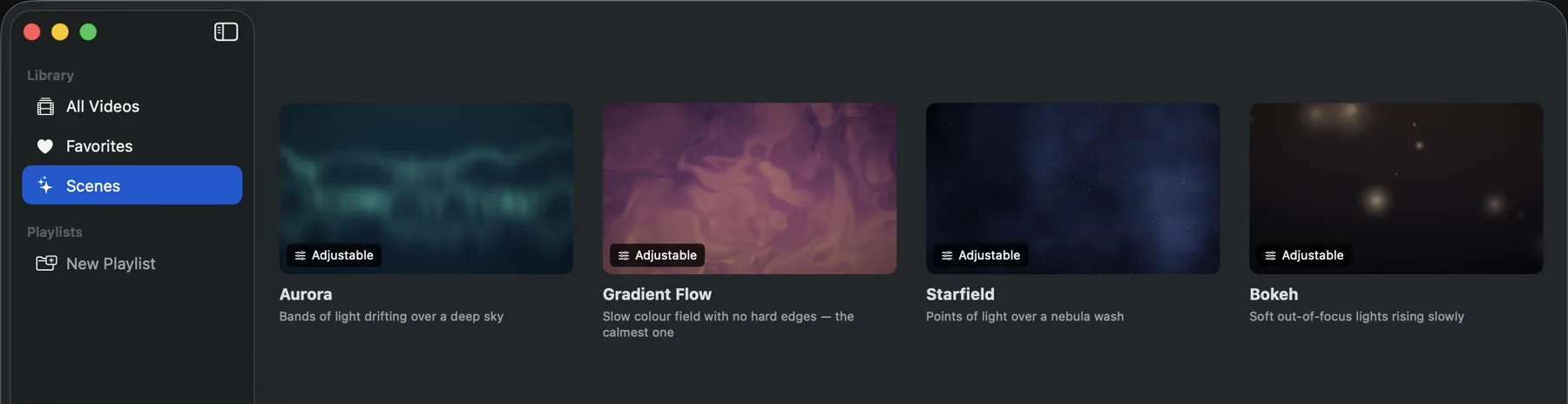
Wallpaper Engine's scene wallpapers come from the Workshop and need Wallpaper Engine to run, so none of them will open on a Mac. A Mac app can draw scenes of its own. Walyro includes four, Aurora, Gradient Flow, Starfield and Bokeh, each with six colour variants, and your Mac draws them in real time with no video file behind them.
You set a scene's motion, brightness and detail. Its switches let it follow the daylight or slow down when windows fill the desktop. You keep saved scenes in the same library and Playlists as your videos, so one display can show a scene while another plays a clip.
What most Mac users want instead
If you searched for this, you want your own files moving on the desktop and a fast way to stop them. Walyro covers that with built-in starter videos, Finder import, four generated scenes, Playlists, and one-click pause from the menu bar.
It runs on macOS 14.0 and later, reads MP4, MOV, and M4V, and is a one-time purchase with no subscription attached.
- Import local MP4, MOV, and M4V files
- Pick a generated scene when you have no video to hand
- Build saved sets with Playlists
- Pause, resume, clear, shuffle, and repeat from familiar controls
Playlists give you the rotation workflow many people expect
One of the most useful parts of wallpaper apps is rotation. People usually want more than one wallpaper and a simple way to change the mood of the desktop during the day.
Walyro Playlists give you that behavior on Mac. You can build a calm work set, a brighter personal set, or a few seasonal mixes, then run them in order or shuffle them. A Playlist can mix scenes and videos.
Mac desks need display-aware wallpaper control
Mac setups shift between laptop-only and docked-with-monitors throughout the day. Walyro lets you target all displays, the main display, or one selected screen, so motion can stay subtle on your work display and louder on the side one.
Wallpaper Engine vs Walyro for Mac users
Desktop OS
- Wallpaper Engine
- Windows 10 and Windows 11
- Walyro on Mac
- macOS 14.0+
Mobile or companion option
- Wallpaper Engine
- Free Android companion app
- Walyro on Mac
- Focused on the Mac desktop workflow
Local video workflow
- Wallpaper Engine
- Video wallpapers in the Windows app
- Walyro on Mac
- Use MP4, MOV, and M4V directly on Mac
Saved rotation
- Wallpaper Engine
- Windows-side playlist workflow
- Walyro on Mac
- Playlists with shuffle and repeat
Display targeting
- Wallpaper Engine
- Multi-monitor support on Windows
- Walyro on Mac
- All displays, main display, or one selected screen
Wallpaper source
- Wallpaper Engine
- Steam Workshop plus your own files
- Walyro on Mac
- Your own files, built-in starter videos, and generated scenes
Scene and shader wallpapers
- Wallpaper Engine
- Workshop scenes, many interactive, plus web wallpapers
- Walyro on Mac
- Four generated scenes with six colour variants each
Price
- Wallpaper Engine
- Paid on Steam, Windows only
- Walyro on Mac
- One-time purchase, no subscription
Works offline
- Wallpaper Engine
- Workshop content needs Steam
- Walyro on Mac
- Playback is fully local once files are on the Mac
Common questions
Is Walyro the same as Wallpaper Engine?
No. Walyro is a separate macOS app and is not affiliated with Wallpaper Engine.
Does Wallpaper Engine work on Mac?
No. Wallpaper Engine's Steam listing supports Windows 10 and Windows 11 on desktop and also references a free Android companion app. It does not list a macOS desktop version.
Can I use my own videos instead of a wallpaper marketplace?
Yes. Walyro supports local MP4, MOV, and M4V files, plus built-in starter videos for quick setup.
Can I run different wallpapers on different monitors?
Yes. Walyro supports all displays, the main display, or one selected screen, and it is built for multi-display Mac setups.
Can I download Wallpaper Engine on Mac?
No. The Steam listing is for Windows only, so it will not install through the Mac Steam client. There is no download that puts it on macOS.
Can I run Wallpaper Engine on Mac with Parallels or a virtual machine?
It will run inside the virtual machine, but the wallpaper only appears on the Windows desktop inside that VM window. Your macOS desktop stays unchanged, so it does not solve the thing you wanted.
Does Boot Camp let me run Wallpaper Engine on a MacBook?
Only on older Intel Macs. Apple has not shipped Boot Camp since the move to Apple silicon, so there is no Boot Camp Assistant on any M-series Mac.
What is the closest Wallpaper Engine alternative for Mac?
A native macOS app comes closest. Walyro plays your own MP4, MOV, and M4V files behind the desktop on macOS 14.0 and later, with per-display targeting and menu bar pause, and it draws four generated scenes when you want motion without a video. It does not run Workshop content.
Can I get Wallpaper Engine scene wallpapers on a Mac?
Workshop scenes need Wallpaper Engine on Windows, so a Mac cannot open them. Walyro draws four scenes of its own, Aurora, Gradient Flow, Starfield and Bokeh, with colours and motion you adjust and no video file behind them.
Is there a free Wallpaper Engine for Mac?
There is no free port of Wallpaper Engine itself. Some macOS live wallpaper apps are free or ad-supported. Walyro is free to download, and a one-time purchase lifts the free version's limits, with no ads, accounts, or subscription. Check the Mac App Store for the price in your region.
Sources & further reading
Choose the Mac-native alternative, not a workaround
Play your own videos or a generated scene, and rotate them through Playlists on any display.

4.7 out of 5 · 95 ratings on the Mac App Store