
Different live wallpapers on each monitor
Walyro lets you set a separate video or Playlist on each display, pause one screen without touching the others, and manage all displays, the main display, or one selected monitor from the same workflow.
Built for real desk setups
If you want different live wallpapers on each Mac monitor, you need per-display control rather than simple mirrored playback. Walyro is built for that. You can send one video or Playlist to the built-in display, a different one to an external monitor, and control each screen separately.
That matters on real desks where each monitor has a different job. Your main display can stay calmer, your side display can carry more motion, and you can pause or clear one screen without touching the others. The same workflow also works when you want one video on all displays instead.
- Display targets
- All displays, the main display, or one chosen monitor
- Widget view
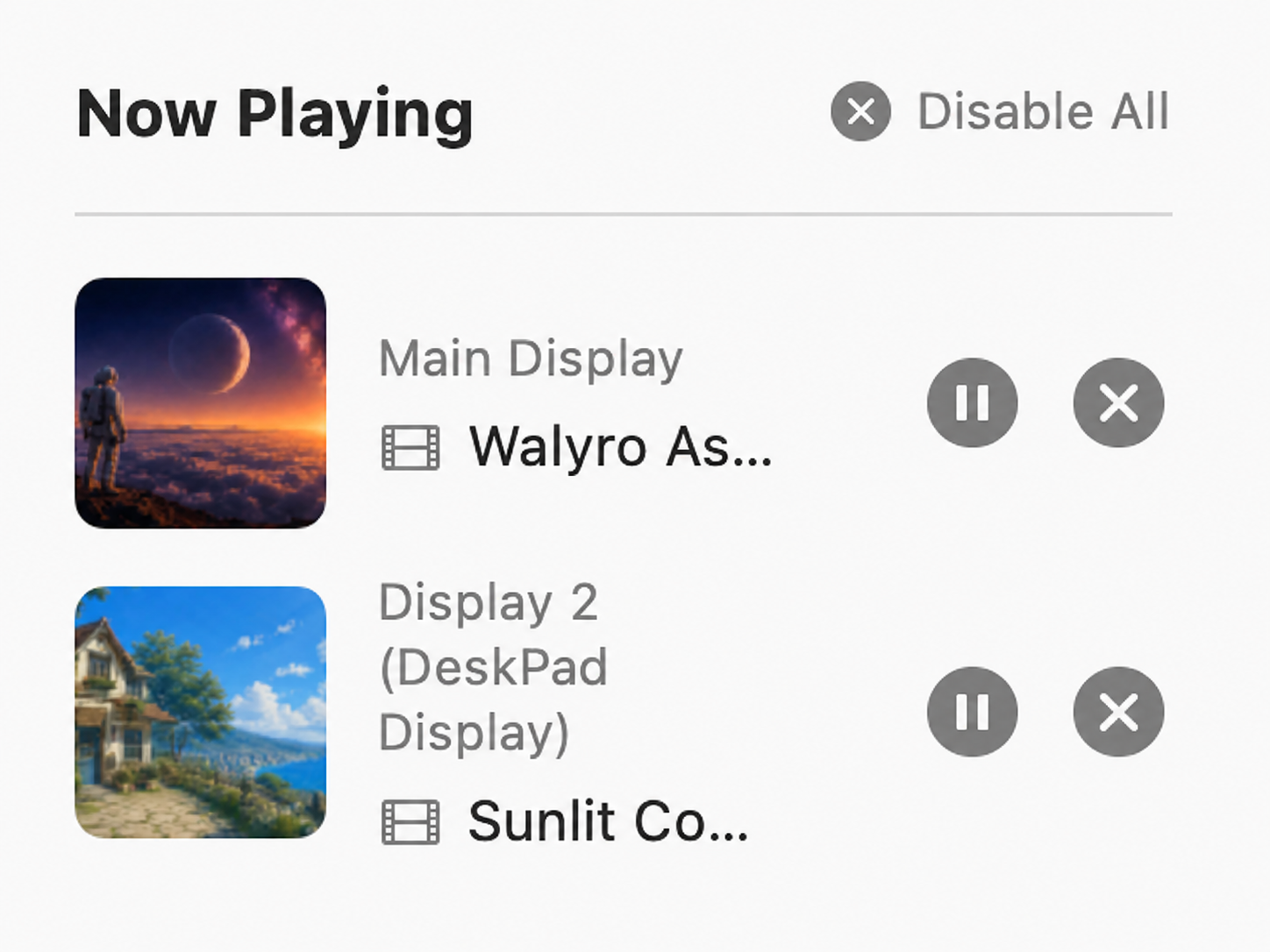
- A separate row for each active display
- Per-display actions
- Pause, resume, clear, and next for Playlists
- Playlist playback
- Sequential or shuffle rotation on a chosen display
- Formats
- MP4, MOV, and M4V; H.264 or HEVC plays best
- Purchase
- One-time purchase, no subscription or ads
Set the right wallpaper on the right screen
Main screen needs a calmer loop behind real work; the side display can carry something more expressive. Walyro treats each display as its own target, or sends the same wallpaper to all of them when that's what you want.
See what every display is doing in the Now Playing widget
Each active monitor gets its own row in Now Playing with the display name, current source, and the actions that fit it. You can see which screen is running which clip at a glance, and pause one without stopping the whole desktop.
- Pause one display without stopping the others
- Clear a single monitor and leave the rest running
- Use Next only where a Playlist is active
- Disable all wallpapers when you want a clean desktop again
Run a Playlist on one monitor and leave the other alone
Start a Playlist on a chosen display, let it rotate through a saved set, and keep a static video or different Playlist on the second screen. Setting a single video manually overrides the Playlist on that display, so the behavior stays predictable.
Made for laptops plus external monitors
Walyro tracks display state, so undocking, switching mirror modes, or dropping from two screens to one keeps the controls coherent. Motion stays manageable when the hardware around it changes.
Common questions
Can each monitor have a different wallpaper?
Yes. Walyro supports independent wallpaper control per display.
Can I still use the same wallpaper on every display?
Yes. You can target all displays when a mirrored setup makes more sense.
Can I pause one display without stopping all wallpapers?
Yes. Per-display controls are built for exactly that workflow.
Does Walyro support multi-display setups?
Yes. Walyro supports multi-display setups with independent control for each display.
Sources & further reading
Give each display its own atmosphere
Run a calm loop on your main screen, something brighter on the second, and control both without losing track of what is playing.

4.7 out of 5 · 95 ratings on the Mac App Store