
Dynamic wallpaper for Mac that follows the daylight and moves
Open System Settings, then Wallpaper, and pick one from the Dynamic section: Apple's photos change with the time of day. For a wallpaper that also moves, you need a live wallpaper app. Walyro's scenes keep moving and follow the daylight: they warm toward sunset and cool in the morning. Walyro plays your own videos too.
Dynamic wallpaper on Mac, clarified
Dynamic wallpaper means a desktop background that changes by itself. On a Mac, Apple uses the phrase for its built-in desktop pictures, which shift between a few preset photos as the day goes on, by your clock and location.
Walyro gives you two kinds that move. Your Mac draws its scenes in real time, and they follow the daylight: the colours warm toward sunset, cool in the morning and deepen at night while the scene keeps moving. Walyro also turns your own MP4, MOV, and M4V files into wallpaper.
- Apple's meaning
- Built-in desktop pictures that change with time of day
- Walyro's scenes
- Four generated scenes whose colours follow the time of day while they move
- Time source
- Your Mac's clock, with no location access
- Walyro's videos
- Your own video files as moving wallpaper
- Display control
- All displays, the main display, or one selected screen
- Formats
- MP4, MOV, and M4V; H.264 or HEVC plays best
- Purchase
- One-time purchase, no subscription or ads
Apple's dynamic wallpaper means time-of-day changes
On macOS, dynamic wallpaper usually refers to Apple's built-in desktop pictures that change appearance throughout the day. They add variety, but they do not turn your own clips, loops, or ambient scenes into wallpaper.
If Apple's built-in scenes are all you want, you may not need another app. This guide matters when you want something more custom than the wallpapers that ship with macOS.
- Apple's dynamic wallpapers use Apple's own built-in images
- They change over time instead of playing your own video files
- They are different from custom moving wallpaper apps
Scenes that follow the daylight while they move
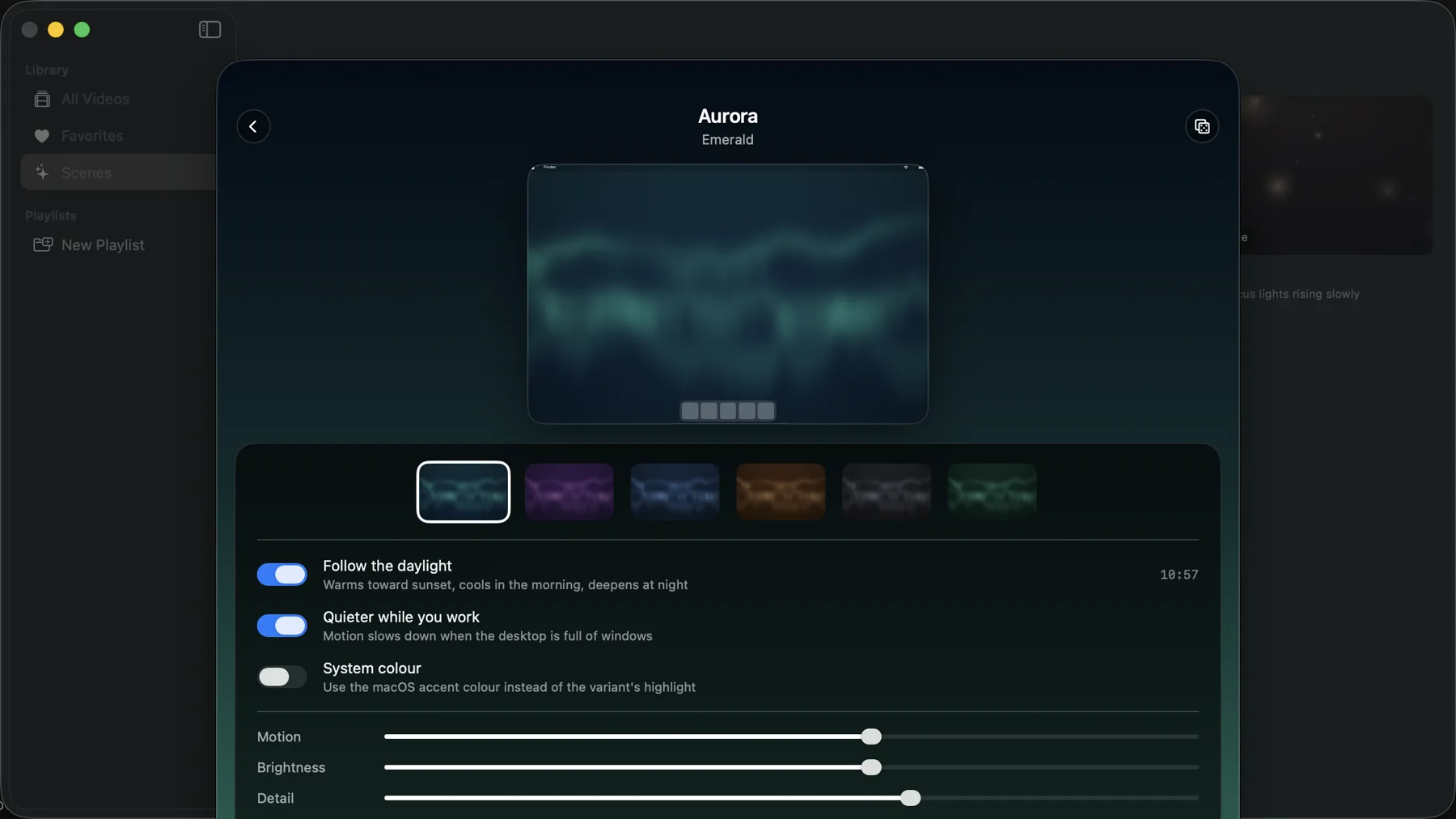
Walyro's scenes are generated wallpapers: your Mac draws each frame as you watch, so no video file sits behind them. Follow the daylight starts switched on. With it, a scene warms its palette toward sunset, cools it in the morning and deepens it at night, and it keeps the colours you chose, shading them warmer or deeper.
Apple's dynamic wallpapers use the same time-of-day idea with still photos that fade into each other. A scene keeps moving all day. Walyro takes the time from your Mac's clock, so you give it no location access. You get four scenes, Aurora, Gradient Flow, Starfield and Bokeh, each with six colour variants.
- Follow the daylight: warmer toward sunset, cooler in the morning, deeper at night
- Quieter while you work: motion slows when windows fill the desktop
- System colour: the highlight follows your macOS accent colour
Or play your own video files
For your own footage, Walyro plays video files too. The built-in starter clips let you test the effect before you import your own MP4, MOV, and M4V files.
Custom dynamic wallpaper needs real controls
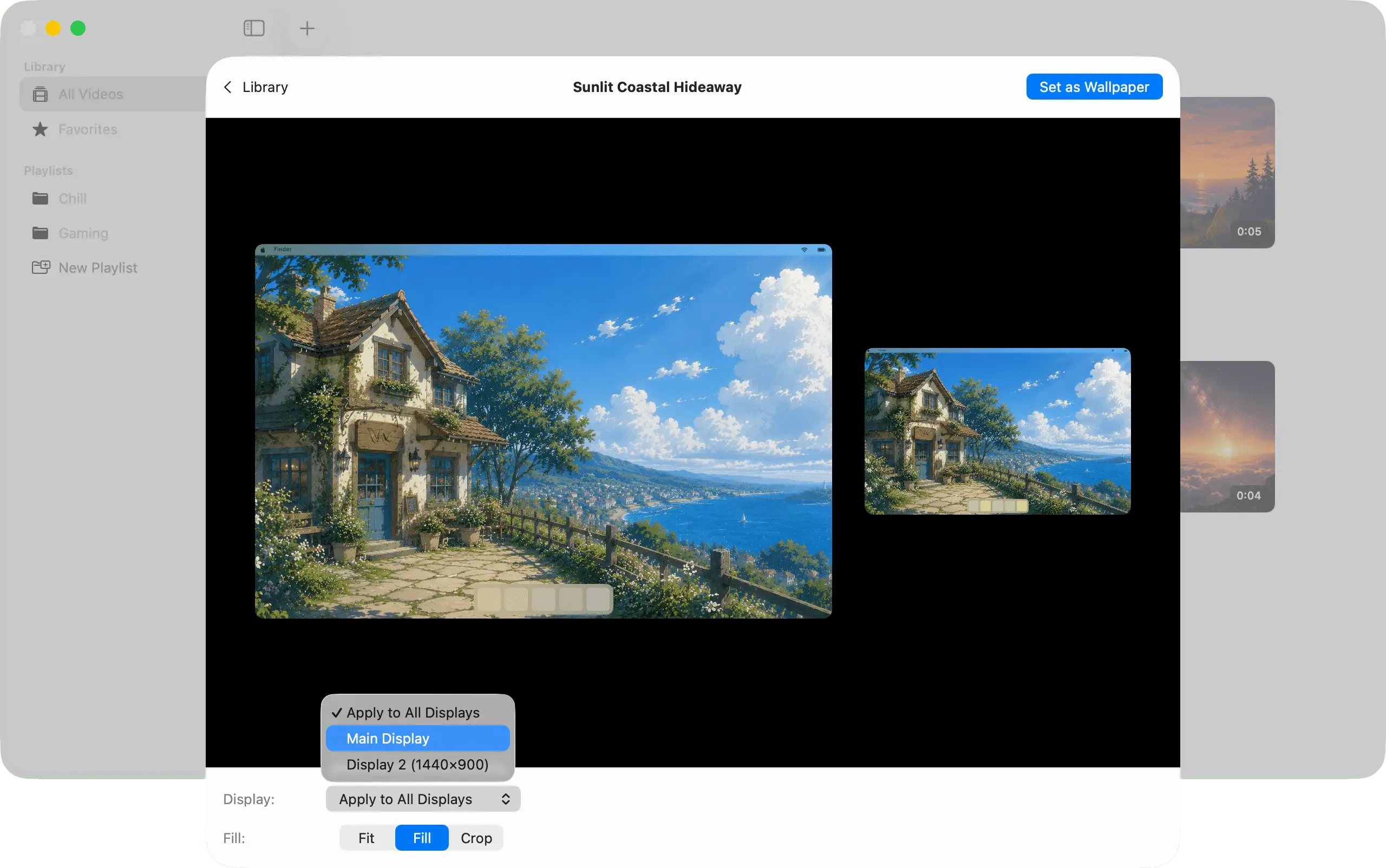
Once you move beyond Apple's built-in choices, control matters as much as motion. Walyro lets you preview the crop, choose Fit, Fill, or Crop, and decide whether the wallpaper should run on every display or only one.
It also keeps playback muted by default and makes pause, resume, and clear actions easy to reach from the menu bar and the Now Playing area. That helps custom motion feel intentional instead of distracting.
- Preview the desktop before you apply the video
- Run motion on one display or several
- Pause quickly when the desktop needs to calm down
A better fit for Mac setups that change during the day
A Mac setup rarely stays the same: undocked in the morning, plugged into a second monitor by afternoon. Walyro adapts to those changes with per-display targeting and one-click pause, so motion never gets in the way when your hardware shifts.
Apple dynamic wallpapers vs Walyro
What it means on Mac
- Apple dynamic wallpapers
- Built-in desktop pictures that change over time
- Walyro
- Generated scenes and your own videos
Follows the time of day
- Apple dynamic wallpapers
- Fades between still photos
- Walyro
- Scenes shift their colours through the day
Visible motion
- Apple dynamic wallpapers
- No
- Walyro
- Yes
Your own files
- Apple dynamic wallpapers
- No custom video workflow
- Walyro
- MP4, MOV, and M4V from your Mac
Display control
- Apple dynamic wallpapers
- Standard Mac wallpaper behavior
- Walyro
- All displays, main display, or one selected screen
Playback control
- Apple dynamic wallpapers
- No pause or resume for video motion
- Walyro
- Menu bar and Now Playing controls
Best fit
- Apple dynamic wallpapers
- People who want Apple's built-in scenes
- Walyro
- People who want custom motion they can control
Common questions
What does dynamic wallpaper mean?
Dynamic wallpaper means a desktop background that changes by itself. On a Mac, Apple uses the term for its built-in time-of-day wallpapers. Walyro adds two kinds that move: generated scenes that follow the daylight, and your own videos.
Can a Walyro wallpaper change with the time of day?
Yes, a scene can. Follow the daylight starts switched on: the scene warms toward sunset, cools in the morning and deepens at night while it keeps moving. Walyro reads the time from your Mac's clock and asks for no location access. A video keeps the colours it has.
Can I make dynamic wallpaper on Mac with my own files?
Yes. Walyro supports local MP4, MOV, and M4V files, plus built-in starter videos for quick setup.
Can dynamic wallpaper run on one monitor or several?
Yes. You can target all displays, the main display, or one selected screen.
Does dynamic wallpaper in Walyro need internet access?
No. Your Mac draws the scenes and plays your videos from its own files, so you need no connection.
Sources & further reading
Choose the kind of dynamic wallpaper you actually want
Keep Apple's time-of-day photos, or pick a scene that follows the daylight and keeps moving.

4.7 out of 5 · 95 ratings on the Mac App Store